





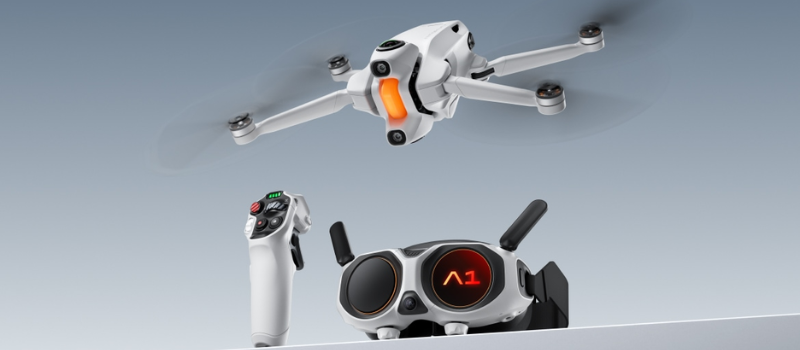
When we thought we'd seen it all in the world of drones, the Antigravity A1 arrives to completely shake up our expectations. This device not only flies with precision and stability, but also incorporates one of the most striking features seen so far on the market: a camera capable of recording in 8K and in 360 degrees. That's right, we're talking about the first drone on the planet to capture immersive images with such high resolution, opening new possibilities for content creators as well as professionals in cinema, advertising, or technical inspection.
In this analysis, we're going to dissect every detail of this technological jewel that's already making waves. How does it perform in flight? Is it easy to handle for those who are not experts? Is its price worth it? And how impressive is that 8K 360° recording, really?
If you're passionate about technology, the audiovisual world, or simply looking for a drone out of the ordinary, stay with us. We'll tell you everything you need to know about the Antigravity A1, a device that not only records the sky… it's also making history.
Compact design of the 8k drone and premium accessories: this is the complete experience of the Antigravity A1
From the very first moment you unbox the Antigravity A1, it's clear this is not just any drone. The model we've tested corresponds to the Infinity package, an edition specially designed to offer a complete experience for both beginners and advanced users. And it really delivers.
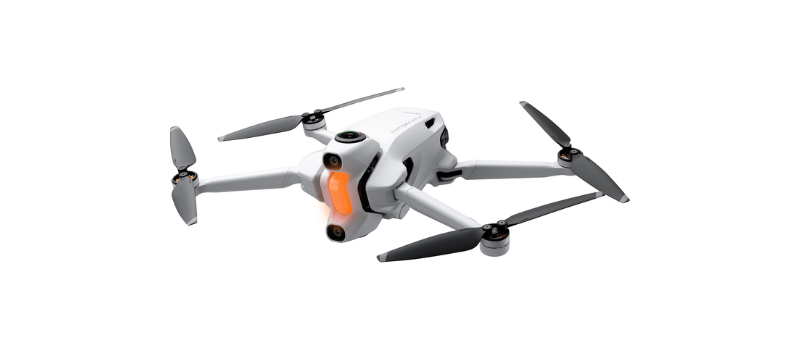
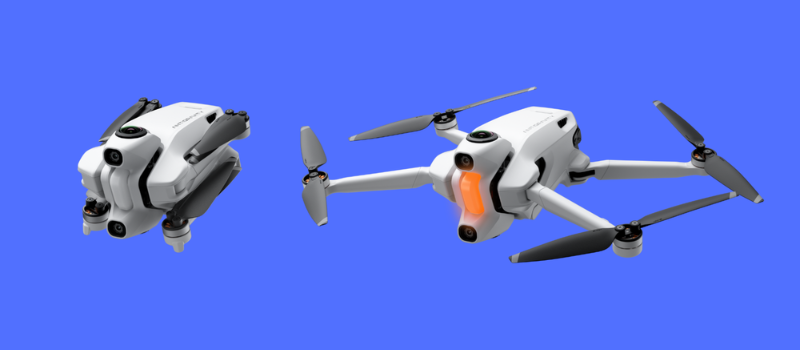
The drone's design is compact, modern, and functional. Its four arms are foldable, which greatly facilitates transport, although at first it can be a bit tricky to store in the protective case, since the blades tend to unfold easily. However, once you become familiar with its structure, the process becomes more intuitive. The important thing is that, once folded, it takes up very little space.
One of the great strengths of the kit is its wide carrying bag, sturdy and padded. It is designed to house not only the drone but also all accessories in an organized and secure way. Among them, three high-capacity batteries (4345 mAh each) stand out, guaranteeing good flight autonomy. These batteries recharge via an included base that uses a side USB-C port. Additionally, thanks to its fast-charging function and an integrated screen that shows the charge percentage of each battery, monitoring energy status is quick and visual.
As for additional accessories, the package includes a microSD card reader with USB-C and Lightning connectors, ideal for transferring content from different devices. Replacements for props and lenses for the 360 cameras are also appreciated, something that demonstrates attention to detail and concern for long-term use.
But the design is not just aesthetic: it's packed with useful technology. The Antigravity A1 includes proximity and collision-avoidance sensors distributed across its body. It has two at the front, two more at the bottom, and infrared sensors that detect obstacles below, which helps prevent accidents, such as flying too close to people or objects.
In short, this drone not only surprises with its power, but also with the care with which it has been presented and equipped.
Vision Goggles: feel a 200-inch screen in front of your eyes while you fly
One of the elements that really elevates the experience with the Antigravity A1 is the spectacular Vision Goggles, smart glasses that do much more than show you what the drone captures. These glasses are not a simple visual accessory: they are the true portable control hub, from which you can manage flight parameters, safety settings, recording modes, and even set the drone's displacement limits. All, without letting go of the controller.
Designed with both comfort and functionality in mind, the Vision Goggles include a padded cushion that fits smoothly to the face, avoiding any discomfort during long flight sessions. The fit is firm but not bothersome, and allows you to move freely while observing the surroundings. Thanks to FreeMotion technology, you can look in any direction and continue exploring the environment, even if the drone is stationary or moving in another direction. This translates into a total immersive experience, ideal for 360-degree recordings.
But what really surprises is the inner screen: each eye enjoys a resolution of 2560 x 2560 pixels, creating the sensation of being in front of a 200-inch screen. It's like having a personal cinema in the heart of nature. And if that wasn't enough, the glasses also include a secondary screen located on the front of one of the lenses. What is it for? If you're accompanied, that person will be able to see the same as you without needing to put on the glasses, perfect for sharing the experience in real time.
Another interesting detail is its external battery, which connects to the glasses via a cable. This battery comes with a handy nylon lanyard to wear it around the neck, freeing your hands and avoiding discomfort during flight. In addition, the glasses feature a microSD card slot, allowing you to store directly everything you see through them. Ideal for those who want to keep reference material or simply relive the experience later.
At the bottom of the glasses you'll find two focus adjustment dials, a key point for those with vision problems or who wear prescription glasses. Thanks to these dials, you can adjust the sharpness of the image to your eyes without external lenses. The clarity obtained is impressive, allowing you to see every detail as if you were right there.
Worried about fogging? Antigravity also thought of that. The Vision Goggles integrate a mini defogging fan that prevents the heat from your face or breath from fogging the view, a common problem in closed devices like this. This small fan works quietly but effectively, keeping the view clear even in humid or hot conditions.
Last but not least, the glasses come with internal speakers that reproduce the ambient sound captured by the drone. Although sometimes the noise from the ventilation system may slightly overshadow them, their presence adds a layer of realism to the flight. You can also control the volume using side buttons, adapting the audio to your liking.
Grip Motion: the controller that turns every flight into an extension of your hands
One of the key components that makes the Antigravity A1 such an intuitive yet advanced flight experience is its Grip Motion remote control. At first glance it may seem like a conventional controller, but just a few minutes holding it makes you realize we are dealing with a device specially designed to offer precise, responsive, and highly versatile control.
The basic joystick functions are easy to understand, even for those who do not have much experience with drones. However, the controller hides a good number of buttons spread across its body, each with a specific function, such as activating flight modes, adjusting recording parameters, or setting safety zones. At first it may seem a bit overwhelming, but after a couple of flights, it becomes natural.
One of the Grip Motion's greatest strengths is its acceleration trigger, which stands out for its extremely high sensitivity. This detail allows you to modulate flight speed with surprising precision: you can opt for smooth maneuvers or more aggressive movements, depending on the environment or the type of shot you're after. Add to that an integrated accelerometer that turns the controller into a true flight rudder. Want the drone to turn left? Just tilt the controller in that direction. Need it to ascend? A tilt upward and that's it. The response is immediate, fluid, and it creates a sense of total control.
As for endurance, the battery status reading and charging system has been well thought out. Both the drone's batteries and those for the Vision Goggles and the controller itself offer visual indicators in the form of four bars. Each represents 25% of charge. In the case of the controller, these are shown on a small screen with green bars, very easy to read outdoors. The best part is that you can check the charge of each battery without needing them connected to the drone or the base, simply by touching the indicator area.
Although the set is complete, there is one improvable detail: the package does not include propeller guards, even though the manual recommends mounting them. In environments with obstacles, such as flights between trees, they are quite missed. It would have been ideal to include them in the Infinity pack, even more so considering the professional level of the equipment.
Finally, it is worth mentioning that the drone's batteries can be charged not only in the included base but also directly inside the drone, thanks to a lateral USB-C port, right next to the memory card slot. This provides more flexibility, especially if you're far from home and need a quick charge without taking anything apart.
Flying with the Antigravity A1: an experience that evolves with you
The first time you prepare to fly the Antigravity A1, it's not enough to charge the batteries and head to the open field. This drone, being a true technological jewel with cutting-edge components, requires some initial preparation. And yes, before takeoff, we had to perform several firmware updates, not only for the drone but also for the remote control, the Vision Goggles, and the safety system.
Although it may seem tedious to have to update so many elements right when you want to fly, the truth is that this step is necessary. Antigravity is constantly refining the system, adding improvements that optimize the user experience. Being the world's first drone with 8K 360° recording, it's logical that it receives frequent updates during its first months of life.
Once everything is updated, turning on and syncing the full system becomes a smoother process. To activate the drone, simply double-tap a tab on the controller. While holding it upward on the second tap until it lights up. Then turn on the remote control from a side button, and finally, the Vision Goggles are activated via the button on their external battery.
With all devices on, the moment comes to pair them. At first it may take a few minutes, especially the first time, but after the first flights, the connection between the drone, the controller, and the goggles becomes more agile. Everything is managed through the official Antigravity app, which acts as the system's core.
Once everything is linked, you just have to enjoy. Put on the goggles, take the remote control, and with a quick quick check of the parameters on the internal screen, you're ready to fly. The sensation is immersive, precise, and very stable, even in moderate wind conditions.
Flying the Antigravity A1 is not just about controlling a drone: it’s about living an immersive experience, where technology, precision, and freedom come together to offer something truly different.
Antigravity A1 flight modes: control the sky in your own way
One of the biggest attractions of the Antigravity A1 is, without doubt, its variety of flight modes, designed for both those starting in the world of drones and experienced pilots who want to take aerial filming to the next level. From fully assisted options to more manual configurations, this drone offers a complete and flexible menu, adjustable according to the type of shot you want to perform or the user's level of experience.
Before takeoff, through the Vision Goggles you can access an intuitive menu where you configure both flight modes, safety limits, maximum altitude, distance, and recording quality. You can also choose whether you prefer capturing content in slow motion or experimenting with a cinematic time lapse.
The standout modes
360° immersive flight: Ideal for those who want to live a completely enveloping experience. While the drone flies, you can turn your head and look around in any direction thanks to its 8K 360° camera. A tip: keep control of the drone's direction, since losing the front view can easily disorient you.
- FreeMotion: This mode lets you point the controller toward where you want the drone to fly, and it will obey. It's perfect for smooth and creative shots, and very easy to master, even if you have no prior experience.
- Classic FPV: Recommended only for expert pilots. Here control is reduced to acceleration and basic turns, using only wrist tilting. Although movement is limited, it offers maximum speed, up to 72 km/h (20 m/s), ideal for fast and dynamic shots.
- Sky Path: An automatic mode that allows planning a route by setting concrete points. The drone will autonomously fly along that path, ideal for capturing smooth and repeatable sequences.
- Deep Track: Although not yet available in the current firmware, this mode promises to automatically follow a person or object, keeping it always centered in the frame. Post-processing will allow you to correct focus if it deviates.
- Sky Genie: Designed to achieve cinematic-style movements. It allows the drone to perform maneuvers such as orbits, spirals, and oval trajectories, adding spectacular flair to any recording.
Startup, flight, and landing
To start the flight, simply double-click a tab on the controller. Holding it up, the drone will automatically rise to 1.2 meters, leaving everything ready to begin flying. During flight, you can start recording at any time, or even switch to photo mode by holding down the corresponding button.
Landing can be manual or automatic. If you prefer to take control, lower the drone to 1.2 meters and hold the tab downward. The landing gear will deploy and descend smoothly. If you’re aiming for efficiency, with a two-second press on the front red button of the controller, the drone will seek a solid surface and land on its own.
Safety and real-time data
From the goggles you can view critical data at all times: altitude above sea level, distance to the pilot, speed, battery status (both the drone's batteries and the accessories') and available space on the memory card.
Remember: under European regulations, you must not exceed 120 meters in altitude or fly beyond visual line of sight. Although the drone can transmit up to 5 km, you can limit these values from the configuration menu.
Battery analysis in the Antigravity A1: endurance that surprises
One of the aspects that surprised us most about the Antigravity A1 with the app is the performance of its batteries. The Infinity pack includes no fewer than three high-capacity batteries, which already promises long flight sessions without interruptions. During our tests, we also used an additional medium-capacity battery (2360 mAh), ideal as a backup in case of emergency.
Recording at a constant resolution of 5.2K at 30 fps, each large battery managed to offer around 25 minutes of real endurance, a figure more than acceptable for a drone with these capabilities. Additionally, the charging management is very intuitive. The included charging base allows inserting two batteries simultaneously, and a third can be charged in the central area by removing a small rubber cap that protects the connectors.
This design is not only practical but also stable, as the base can stand upright thanks to that same central leg.
Conclusion: Antigravity A1, a new era in immersive flight and recording
After several days of intense testing, the Antigravity A1 with insta360 has proven beyond a doubt that it is not just another drone on the market. We are looking at a revolutionary device that combines cutting-edge technology, a unique immersive flight experience, and recording quality that almost borders on cinematic. Its 8K 360-degree camera opens up new creative possibilities, and its multiple flight modes cater to both beginners and advanced users.
The Vision Goggles, the Grip Motion control, the long-lasting batteries, and the number of smart features turn this drone into a genuine portable aerial recording station. While there is room for improvement in some small details —such as the absence of included blade guards—, the truth is that the overall experience is surprisingly smooth and satisfactory.